
Efficient Solutions for Industrial Needs
ANSYS Discovery
<strong About Ansys Discovery Pro is the next generation modeling software with excellent tools to create, edit and simulate geometry all in one program. In Discovery, processing of scanned files is very easy and flexible to use. Especially the new subdivision tool in Discovery revolutionizes the possibilities of reverse engineering.
Ansys Discovery
Ansys Discovery represents the cutting edge of modern product design by combining dynamic 3D-modeling and immediate simulation into a seamless workflow. The software is designed to meet the needs of demanding engineering offices and industries, where the goal is to accelerate product development without compromising technical accuracy. Unlike traditional CAD design, Discovery enables interactive geometry modification in a way that gives the designer freedom to experiment with new concepts without complex constraints based on historical data. This direct modeling technique plays a key role when preparing models for analysis or optimizing a product’s physical properties during the ideation phase.
At the core of the software is usability and efficiency, which allows for the management of complex 3D configurations. With Discovery, users can repair damaged geometry, simplify models for calculation, and create entirely new shapes from scratch. It functions as an excellent bridge between different CAD systems, as it supports most common file formats and allows for the immediate modification of imported models. With professional-level tools, such as topology optimization, engineers can have the software suggest an optimal material distribution based on loads, leading to lighter and more durable end products.
Integrated Multiphysics Simulation as Part of the Design Process
Simulation is not just a separate step in Ansys Discovery; it’s an integral part of the modeling environment. The software utilizes GPU-based computing to provide real-time feedback in areas such as mechanics of solids, computational fluid dynamics (CFD), and heat transfer. This means that the designer immediately sees how a change in the 3D model affects the product’s mechanical strength or fluid behavior. As the design progresses, Discovery offers the possibility to transition to high-accuracy analyses using reliable Ansys Fluent and Mechanical solvers directly within the same interface.
This predictive approach to simulation significantly reduces the need for expensive physical prototypes and minimizes the risk of errors in later development stages. Ansys Discovery’s ability to combine high-end 3D-modeling with deep physics understanding makes it an indispensable tool in modern digital product development, where speed and innovation capability define market success.
Ten Top Reasons to Switch to Ansys Discovery Modeler
- Access to new modeling features (including TECS)
- Strong modeling improvements (new kernel)
- Helpful learning tools
- Modernized user interface
- Productivity improvements
- Improved tools
- Enhanced reverse engineering features
- History-based modeling
- Wide coverage of translators
- Access to physics (optional add-on)*
Lataukset
MANY REASONS TO TRANSITION TO NEW Discovery license features
Discovery pro
The user interface has been further refined for better usability, a more pleasant and efficient workflow in Discovery. Discovery Pro tutorials and instructions have been integrated directly into the program so that help can be displayed on the screen immediately if needed.

Ansys Discover in Strong Modeling Tools
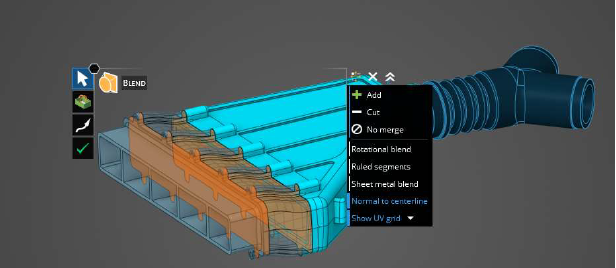
Improved blending, Boolean additions/subtractions and panning bring excellent SpaceClaim direct modeling features to a new level. User-known and loved tools in Discover!

Ansys Discovery with Productivity Improvements
“Halo” offers a radial menu for common tools, selection and physics so that you can focus on the essential, namely modeling. Heads Up Display (HUD) brings Options, tool guides and tool guides close to the cursor to make the model even faster.

Subdivision Modeling (Sub-D)
Subdivision Modeling
- Enables rapid creation and modification of organic shapes
- Convert solids and faceted parts into Sub-D parts
Applications:
For facet parts – Editing scanned data to other forms – Rapid creation of organic shapes which would require a lot of time/be difficult to draw/extrude/etc. – Editing complex CAD – Jump into the Sub-D model world!

Simulation
Ansys Discovery enables versatile multifield simulation directly in the modeling phase. The software can be used to analyze structural strength, such as stresses and vibrations, as well as simulate fluid and gas flow with associated pressure losses. In terms of thermal management, it covers conduction and convection, which is critical for example in electronics cooling. In addition, the tool supports electromagnetic modeling and utilizes topology optimization for automated, manufacturable structural design.


