
Efficient Solutions for Industrial Needs
DESIGNER 3D
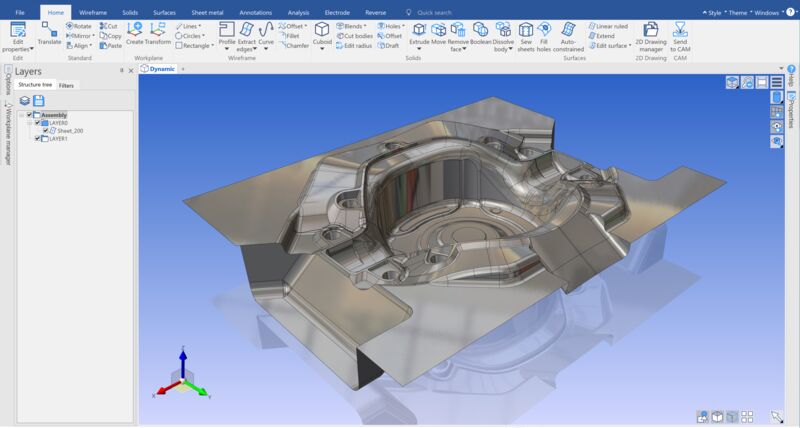
Efficient CAD software for creating and modifying complex 3D models, suitable for excellent CAM use and reverse engineering. Intuitive user interface and wide import support facilitate workflow.
Modeling for Manufacturing
DESIGNER is an ideal CAD solution for CAM, from electrode design to repairing damaged models, reverse engineering, DESIGNER is the best CAD solution for manufacturing complex models
DESIGNER Functions Quickly:
- Easy to learn, intuitive user interface
- Direct modeling in the CAD environment
- Combined surface, solid & mesh modeling environment
- Seamless links to all Hexagon CAM platforms
- Sketching with automatic zone creation
- Impressive third-party CAD model surface repair
- Wide range of CAD import formats
- Separate reverse engineering package (versions2021.0)
- Efficient 2D drawing environment
Direct Modeling
Direct modeling frees the user from the limitations of traditional modeling systems. With direct modeling, the user can push, pull, and drag geometry to achieve the desired shape instead of changing a long parameter set to make design changes. These changes can be completely freeform or based on numerical additions and measurements taken from existing geometry. The knowledge of how the original model was built is no longer needed, and design changes are not limited to the original creation methods. Direct modeling gives the user full building freedom regardless of whether a new component is being created or an existing model is being modified that has been created in countless CAD formats that SURFCAM | Designert supports.
Ease of Use
Simple menu and icon commands with context-sensitive online help make it quick and easy to start using CAM | with DESIGNER. Dynamic rotation, zooming and panning together with programmable function keys and mouse buttons speed up software operation. Unlimited undoing and redoing using user-defined bookmarks gives the designer the ability to move back and forth through the entire design process. Multi-layer and multi-origin management with user-defined color palettes and line styles makes it easier to inspect, create and process very complex models. Fast rendering, transparency control and dynamic cutting simplify the visualization of CAD files and large assemblies. Model Improvement Small gaps between surfaces in imported models can be automatically repaired, preventing time-consuming processes of rebuilding small surface patches. If the surfaces are damaged or missing DESIGNER automatically creates edge curve geometry, which makes it easier to rebuild new faces with a comprehensive surface package. Automation makes the model cleaning process much faster and simpler. Closing the surface model to produce a fixed body eliminates construction problems in the design process and immediately brings the benefits of fixed modeling to the user. The ability to seamlessly switch between fixed and surface techniques offers unlimited freedom, ensuring that the user can work with difficult CAD data.
Feature Suppression
Many CAD data sets contain geometric features that are either unnecessary for CAM or that are not created by the machining process itself. Post-processing processes such as laser engraving, EDM markings and other techniques are often represented in the model. While this was important for CAD design and remains in the final component, such markings often block the CAM programmer’s work.
Model Simplification
In addition to suppressing specific features of a model that is not used in machining, the user may want to simplify the geometry in various stages of the machining process. Removing parts of the model, such as cutting features, speeds up the machining process and yields better results. The ability to modify the model without being tied to the previous construction method or feature tree limits is incredibly powerful. Creating model variations for each stage of the machining process is easy and your machining results will be both faster and of higher quality.
Effective Sketching
DESIGNER’s sketching features enable the creation of two-dimensional shapes using freeform input. While the user can rely on traditional coordinate-based input methods, freeform sketching intelligently interacts with surrounding geometry. This ability to intuitively create implicit limits using other geometry speeds up the sketching process while maintaining maximum flexibility for future changes.
2D Data Usage
SURFCAM | Designer supports the import of DXF and DWG files, allowing the user to convert existing 2D data into a 3D model simply by using the original data from imported profiles. The imported data automatically creates sketch profile areas, making the transition from 2D to 3D easier than ever.
Wide Range of CAD Interfaces
DESIGNER imports data from various formats such as Parasolid, IGES, STEP, ACIS, DXF, DWG, STL and VDA CAD system’s original data is imported from the following CAD systems: Catia V4 & V5 Pro / TEKNIIKKA & PTC Creo Autodesk Inventor Siemens NX SolidWorks Solid Edge This wide range of translator options ensures that users can work with data from almost any manufacturer. Very large files can be easily processed, and companies working with complex models benefit from the simplicity of the customer’s CAD data. Manufacturer pages: DESIGNER
Efficient
DESIGNER’s efficient design and finishing features open up new possibilities for manufacturers for more intelligent production over a wide range of applications.
Intuitive
DESIGNER removes complexity from design and simplifies and streamlines workflows, giving users confidence and agility.

Versatile
The DESIGNER’s versatile features, scalability and compatibility give users the freedom to design and optimize parts successfully for smarter manufacturing.


